Section 06: Agentic RAG with LangGraph
Duration: ~90 minutes
Goal: Build an AI agent that decides which tools to use for each financial analysis question — vector search, graph query, ratio calculation, or document summarization.
What is an AI Agent?
Think of how a senior CA analyst answers a complex question:
"Analyze the financial health of NMB Bank for FY2023."
They don't just search one textbook. They: 1. Look up the key financial figures (net profit, assets, liabilities) 2. Compute ratios (current ratio, ROE, debt-equity) 3. Check the auditor's notes for any warnings 4. Summarize the MD&A section for strategic context 5. Synthesize everything into a coherent picture
An AI agent does the same — it has tools (functions it can call) and an LLM brain (GPT-4o) that decides which tools to call and in what order.
                    ┌─────────────────────┐
                    │   Financial Agent   │
                    │   (LangGraph)       │
                    └─────────┬───────────┘
                              │
              ┌───────────────┼───────────────┐
              ▼               ▼               ▼               ▼
        rag_search      graph_query    ratio_calculator  doc_summarizer
     (ChromaDB vector  (Neo4j Cypher  (compute financial (summarize a
      similarity)       traversal)    ratios)             document section)
LangGraph Explained
LangGraph builds on LangChain to create stateful agent workflows using a graph structure:
- Nodes = steps in the workflow (Planner, Tool Selector, Synthesizer)
- Edges = transitions (conditional — based on the LLM's decision)
- State = working memory (the conversation, tool outputs, intermediate results)
[START]
   │
   ▼
[Planner] — reads the user question, decides which tools are needed
   │
   ▼
[Tool Selector] — calls the selected tool(s)
   │
   ├──► [rag_search]          → returns relevant text chunks
   ├──► [graph_query]         → returns structured entity/relationship data
   ├──► [ratio_calculator]    → returns computed financial ratios
   └──► [doc_summarizer]      → returns section summary
              │
              ▼
        [Synthesizer] — combines all tool outputs into final answer
              │
              ▼
           [Output]
              │
         (loop back if answer is incomplete)
# ── Setup check: verify PDFs and Neo4j connection ────────────────────────────
import os, subprocess, sys
from pathlib import Path

DATA_DIR = Path("../data").resolve()
REQUIRED_PDFS = [
    DATA_DIR / "annual_reports" / "nmb_bank_annual_report_2023.pdf",
    DATA_DIR / "annual_reports" / "nmb_bank_annual_report_2022.pdf",
    DATA_DIR / "annual_reports" / "nepal_telecom_annual_report_2023.pdf",
    DATA_DIR / "financial_statements" / "nmb_bank_financials_2023.pdf",
    DATA_DIR / "financial_statements" / "nepal_telecom_financials_2023.pdf",
]
if any(not p.exists() for p in REQUIRED_PDFS):
    print("PDFs missing — running data generator...")
    subprocess.run([sys.executable, str(DATA_DIR / "generate_sample_data.py")],
                   check=True, cwd=str(DATA_DIR))
print(f"All {len(REQUIRED_PDFS)} PDFs are ready.")

if not os.environ.get("OPENAI_API_KEY"):
    print("WARNING: OPENAI_API_KEY is not set.")

try:
    from py2neo import Graph
    _g = Graph("bolt://localhost:7687", auth=("neo4j", "icandemo123"))
    _g.run("RETURN 1").data()
    print("Neo4j is reachable. (Run Sections 03 and 04 first to populate it.)")
except Exception as e:
    print("Neo4j NOT reachable — graph_query tool will return empty results until you start Neo4j.")
    print(f"  ({type(e).__name__}: {e})")
All 5 PDFs are ready.
Neo4j is reachable. (Run Sections 03 and 04 first to populate it.)
import os
import re
import json
import textwrap
import chromadb
import tiktoken

from typing import TypedDict, Annotated, Sequence
from openai import OpenAI
from pypdf import PdfReader
from py2neo import Graph

from langchain_openai import ChatOpenAI
from langchain_core.messages import BaseMessage, HumanMessage, AIMessage, ToolMessage
from langchain_core.tools import tool
from langgraph.graph import StateGraph, START, END
from langgraph.graph.message import add_messages
from langgraph.prebuilt import ToolNode
from IPython.display import display, Image

client = OpenAI(api_key=os.environ.get("OPENAI_API_KEY"))
llm = ChatOpenAI(model="gpt-4o", temperature=0, api_key=os.environ.get("OPENAI_API_KEY"))
EMBED_MODEL = "text-embedding-3-small"
enc = tiktoken.get_encoding("cl100k_base")

neo4j_graph = Graph("bolt://localhost:7687", auth=("neo4j", "icandemo123"))
print("All libraries loaded.")
/Users/aayush/Library/Python/3.9/lib/python/site-packages/urllib3/__init__.py:35: NotOpenSSLWarning: urllib3 v2 only supports OpenSSL 1.1.1+, currently the 'ssl' module is compiled with 'LibreSSL 2.8.3'. See: https://github.com/urllib3/urllib3/issues/3020
  warnings.warn(


/Users/aayush/Library/Python/3.9/lib/python/site-packages/langgraph/cache/base/__init__.py:8: LangChainPendingDeprecationWarning: The default value of `allowed_objects` will change in a future version. Pass an explicit value (e.g., allowed_objects='messages' or allowed_objects='core') to suppress this warning.
  from langgraph.checkpoint.serde.jsonplus import JsonPlusSerializer


All libraries loaded.
# Visualize the LangGraph agent state graph using Mermaid
from IPython.display import display, HTML

mermaid_diagram = """
graph TD
    START([START]) --> planner[Planner]
    planner -->|has tool calls| tools[Tool Executor]
    planner -->|no tool calls| END([END: Final Answer])
    tools --> rag_search[rag_search<br/>ChromaDB]
    tools --> graph_query[graph_query<br/>Neo4j]
    tools --> ratio_calc[ratio_calculator<br/>Financial Ratios]
    tools --> doc_sum[doc_summarizer<br/>Section Summary]
    rag_search --> synthesizer[Synthesizer]
    graph_query --> synthesizer
    ratio_calc --> synthesizer
    doc_sum --> synthesizer
    synthesizer -->|needs more info| planner
    synthesizer -->|complete| END
"""

html = f"""
<script src="https://cdn.jsdelivr.net/npm/mermaid/dist/mermaid.min.js"></script>
<div class="mermaid">{mermaid_diagram}</div>
<script>mermaid.initialize({{startOnLoad:true}});</script>
"""
display(HTML(html))
print("Agent state graph displayed above.")
ChromaDB] tools --> graph_query[graph_query
Neo4j] tools --> ratio_calc[ratio_calculator
Financial Ratios] tools --> doc_sum[doc_summarizer
Section Summary] rag_search --> synthesizer[Synthesizer] graph_query --> synthesizer ratio_calc --> synthesizer doc_sum --> synthesizer synthesizer -->|needs more info| planner synthesizer -->|complete| END
Agent state graph displayed above.
# Define agent state schema
class AgentState(TypedDict):
    messages: Annotated[Sequence[BaseMessage], add_messages]

print("AgentState schema defined.")
AgentState schema defined.
# Tool 1: rag_search — wraps ChromaDB paragraph-based retrieval
# Rebuild ChromaDB (or reuse from Section 05 if same session)

def paragraph_chunks(text, min_length=100, max_length=2000):
    raw = re.split(r"\n{2,}", text)
    chunks, buffer = [], ""
    for para in raw:
        para = para.strip()
        if not para:
            continue
        if len(buffer) + len(para) < max_length:
            buffer = (buffer + "\n\n" + para).strip()
        else:
            if len(buffer) >= min_length:
                chunks.append(buffer)
            buffer = para
    if len(buffer) >= min_length:
        chunks.append(buffer)
    return chunks

chroma_client = chromadb.Client()
collection = chroma_client.create_collection("agent_docs", metadata={"hnsw:space": "cosine"})

DOCS = [
    "../data/annual_reports/nmb_bank_annual_report_2022.pdf",
    "../data/annual_reports/nmb_bank_annual_report_2023.pdf",
    "../data/annual_reports/nepal_telecom_annual_report_2023.pdf",
    "../data/financial_statements/nmb_bank_financials_2023.pdf",
    "../data/financial_statements/nepal_telecom_financials_2023.pdf",
]

all_chunks, all_ids = [], []
for doc_i, path in enumerate(DOCS):
    try:
        reader = PdfReader(path)
        text = "\n".join(p.extract_text() or "" for p in reader.pages)
        chunks = paragraph_chunks(text)
        for j, chunk in enumerate(chunks):
            all_chunks.append(chunk)
            all_ids.append(f"doc{doc_i}_chunk{j}")
        print(f"  {os.path.basename(path)}: {len(chunks)} chunks")
    except Exception as e:
        print(f"  Skipped {os.path.basename(path)}: {e}")

all_embeds = []
for i in range(0, len(all_chunks), 100):
    batch = all_chunks[i:i+100]
    resp = client.embeddings.create(model=EMBED_MODEL, input=batch)
    all_embeds.extend([item.embedding for item in resp.data])

if all_chunks:
    collection.add(documents=all_chunks, embeddings=all_embeds, ids=all_ids)
    print(f"\nChromaDB: {collection.count()} chunks ready.")
  nmb_bank_annual_report_2022.pdf: 2 chunks
  nmb_bank_annual_report_2023.pdf: 5 chunks
  nepal_telecom_annual_report_2023.pdf: 3 chunks
  nmb_bank_financials_2023.pdf: 3 chunks
  nepal_telecom_financials_2023.pdf: 3 chunks


ChromaDB: 16 chunks ready.
# Define Tool 1: rag_search
@tool
def rag_search(query: str) -> str:
    """Search for relevant text passages from NMB Bank and Nepal Telecom annual reports and financial statements.
    Use for: narrative information, policy descriptions, risk factors, MD&A, board discussions."""
    q_embed = client.embeddings.create(model=EMBED_MODEL, input=[query]).data[0].embedding
    results = collection.query(query_embeddings=[q_embed], n_results=5)
    chunks = results["documents"][0]
    return "\n\n---\n\n".join(chunks)

print("Tool 1: rag_search defined.")
Tool 1: rag_search defined.
# Define Tool 2: graph_query — wraps Neo4j Cypher retrieval
@tool
def graph_query(query: str) -> str:
    """Query the financial knowledge graph for structured entity and relationship data.
    Use for: financial metrics, subsidiaries, auditors, board members, cross-year comparisons,
    inter-company comparisons, and relationship traversals."""
    # Extract entities from the query
    entity_prompt = (
        "Extract company names and financial metric names from this query. "
        'Return JSON: {"companies": [...], "metrics": [...]}. Return ONLY JSON.'
    )
    resp = client.chat.completions.create(
        model="gpt-4o-mini",
        messages=[
            {"role": "system", "content": entity_prompt},
            {"role": "user",   "content": query}
        ],
        temperature=0,
        response_format={"type": "json_object"}
    )
    entities = json.loads(resp.choices[0].message.content)

    parts = []
    for company in entities.get("companies", []):
        rows = neo4j_graph.run("""
            MATCH (c)-[:REPORTED]->(m:FinancialMetric)
            WHERE c.name CONTAINS $company
            RETURN c.name AS company, m.name AS metric, m.value AS value,
                   m.unit AS unit, m.period AS period
            LIMIT 20
        """, company=company).data()
        if rows:
            parts.append(f"[{company} — Financial Metrics]")
            for r in rows:
                parts.append(f"  {r['metric']}: {r['value']} {r.get('unit','')} ({r.get('period','')})")

        for rel_type, label in [("AUDITED_BY", "AuditFirm"), ("SUBSIDIARY_OF", "Subsidiary"), ("CHAIRED_BY", "Person")]:
            rows = neo4j_graph.run(
                f"MATCH (c)-[:{rel_type}]->(t:{label}) WHERE c.name CONTAINS $company RETURN t.name AS name",
                company=company
            ).data()
            if rows:
                parts.append(f"[{company} — {rel_type}]")
                for r in rows:
                    parts.append(f"  {r['name']}")

    if not parts:
        return "No relevant data found in the knowledge graph for this query."
    return "\n".join(parts)

print("Tool 2: graph_query defined.")
Tool 2: graph_query defined.
# Define Tool 3: ratio_calculator
@tool
def ratio_calculator(context: str) -> str:
    """Compute financial ratios from a text context containing financial figures.
    Extracts numbers and computes: Current Ratio, ROE, Debt-Equity Ratio, Net Profit Margin.
    Input: text containing financial figures (from rag_search or graph_query output)."""
    system = """You are a financial calculator assistant. From the provided context:
1. Extract key financial figures (Total Assets, Total Liabilities, Equity, Net Profit, Revenue, Current Assets, Current Liabilities)
2. Calculate available ratios:
   - Current Ratio = Current Assets / Current Liabilities
   - ROE = Net Profit / Total Equity × 100%
   - Debt-Equity Ratio = Total Liabilities / Total Equity
   - Net Profit Margin = Net Profit / Total Revenue × 100%
3. Show your working (formula → values → result)
4. Clearly state which ratios could NOT be computed (missing data)
Return as structured text."""

    resp = client.chat.completions.create(
        model="gpt-4o-mini",
        messages=[
            {"role": "system", "content": system},
            {"role": "user",   "content": f"Financial data context:\n{context}"}
        ],
        temperature=0
    )
    return resp.choices[0].message.content

print("Tool 3: ratio_calculator defined.")
Tool 3: ratio_calculator defined.
# Define Tool 4: doc_summarizer
@tool
def doc_summarizer(section_name: str) -> str:
    """Retrieve and summarize a named section from the annual reports.
    Use for sections like: MD&A, Auditor's Report, Board Report, Corporate Governance, Risk Management.
    Input: the section name to find and summarize."""
    q_embed = client.embeddings.create(
        model=EMBED_MODEL, input=[section_name]
    ).data[0].embedding

    results = collection.query(query_embeddings=[q_embed], n_results=6)
    section_chunks = results["documents"][0]
    context = "\n\n".join(section_chunks)

    system = (
        f"Summarize the '{section_name}' section from this annual report context. "
        "Focus on key findings, material information, and any red flags. "
        "Be concise — aim for 3–5 bullet points."
    )
    resp = client.chat.completions.create(
        model="gpt-4o-mini",
        messages=[
            {"role": "system", "content": system},
            {"role": "user",   "content": context}
        ],
        temperature=0
    )
    return resp.choices[0].message.content

print("Tool 4: doc_summarizer defined.")
Tool 4: doc_summarizer defined.
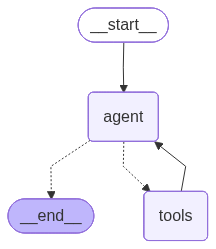
# Build the LangGraph agent
tools_list = [rag_search, graph_query, ratio_calculator, doc_summarizer]
llm_with_tools = llm.bind_tools(tools_list)
tool_node = ToolNode(tools_list)

def should_continue(state: AgentState):
    last_message = state["messages"][-1]
    if hasattr(last_message, "tool_calls") and last_message.tool_calls:
        return "tools"
    return END

def call_model(state: AgentState):
    messages = state["messages"]
    response = llm_with_tools.invoke(messages)
    return {"messages": [response]}

# Build graph
workflow = StateGraph(AgentState)
workflow.add_node("agent", call_model)
workflow.add_node("tools", tool_node)
workflow.add_edge(START, "agent")
workflow.add_conditional_edges("agent", should_continue, {"tools": "tools", END: END})
workflow.add_edge("tools", "agent")

agent = workflow.compile()
print("LangGraph agent compiled successfully.")

# Try to display the graph
try:
    display(Image(agent.get_graph().draw_mermaid_png()))
except Exception:
    print("(Install graphviz/playwright to render graph image)")
LangGraph agent compiled successfully.
Workflow 1: Financial Health Analysis
# Run Workflow 1: Analyze the financial health of NMB Bank for FY2023
SYSTEM_PROMPT = """You are an expert financial analyst assistant for CA professionals in Nepal.
You have access to NMB Bank and Nepal Telecom annual reports and financial statements.
Use your tools to provide comprehensive, data-backed answers.
Always cite the source (RAG, graph, or computed ratio) for each fact you state."""

QUERY1 = "Analyze the financial health of NMB Bank for FY2023"

print(f"Running Workflow 1: {QUERY1}")
print("=" * 70)
print("Step-by-step agent trace:")
print()

inputs = {
    "messages": [
        {"role": "system", "content": SYSTEM_PROMPT},
        HumanMessage(content=QUERY1)
    ]
}

step_count = 0
for chunk in agent.stream(inputs, stream_mode="updates"):
    step_count += 1
    for node_name, node_output in chunk.items():
        if node_name == "agent":
            msg = node_output["messages"][-1]
            if hasattr(msg, "tool_calls") and msg.tool_calls:
                for tc in msg.tool_calls:
                    args_preview = str(tc["args"])[:80]
                    print(f"  [Step {step_count}] Calling tool: {tc['name']}({args_preview}...)")
            else:
                print(f"  [Step {step_count}] Agent produced final answer.")
        elif node_name == "tools":
            for msg in node_output["messages"]:
                tool_result_preview = str(msg.content)[:120].replace("\n", " ")
                print(f"    Tool result: {tool_result_preview}...")

print()
# Get the final answer
final_state = agent.invoke(inputs)
final_answer = final_state["messages"][-1].content
print("FINAL ANSWER:")
print(final_answer)
Running Workflow 1: Analyze the financial health of NMB Bank for FY2023
======================================================================
Step-by-step agent trace:


  [Step 1] Calling tool: rag_search({'query': 'NMB Bank financial statements FY2023'}...)
  [Step 1] Calling tool: doc_summarizer({'section_name': 'Management Discussion and Analysis'}...)
  [Step 1] Calling tool: doc_summarizer({'section_name': "Auditor's Report"}...)


    Tool result: NMB Bank Limited Annual Report — Fiscal Year 2022/23 (FY2023) Registered Office: Babarmahal, Kathmandu, Nepal  |  Compan...
    Tool result: - **Operating Environment**: The Nepalese banking sector faced challenges due to a tight monetary policy by the Nepal Ra...
    Tool result: **Auditor's Report Summary: Key Findings and Red Flags**  - **NMB Bank Limited**: The financial statements were deemed t...


  [Step 3] Agent produced final answer.


FINAL ANSWER:
The financial health of NMB Bank for FY2023 can be assessed through several key metrics and insights from the financial statements, Management Discussion and Analysis (MD&A), and the Auditor's Report:

### Financial Performance
- **Net Profit Growth**: NMB Bank achieved a net profit growth of 9.8% year-on-year, indicating a resilient performance despite challenging macroeconomic conditions (RAG).
- **Total Assets and Deposits**: The bank's total assets increased by 8.79% to NPR 298,420 million, and total deposits grew by 9.32% to NPR 251,640 million, reflecting strong growth in its balance sheet (RAG).
- **Net Interest Income**: There was a 13.22% increase in net interest income, which suggests improved interest margins and effective interest rate management (RAG).

### Capital and Liquidity
- **Capital Adequacy Ratio**: The bank's Capital Adequacy Ratio improved to 13.20%, which is above the regulatory minimum, indicating a strong capital position (MD&A).
- **Liquidity Position**: The loans-to-deposits ratio was 84.6%, showing healthy liquidity levels. The bank also issued NPR 2.0 billion in subordinated debentures to strengthen its Tier 2 capital (MD&A).

### Asset Quality
- **Non-Performing Loans (NPL)**: The NPL ratio rose to 2.41%, primarily due to stress in the tourism and trading sectors. However, the bank has strengthened its provision coverage to 138%, which is a positive step towards managing potential credit risks (MD&A).

### Risk Management
- **Key Risks**: The bank faces credit risk from concentration in the hydropower and real estate sectors, liquidity risk from tighter interbank markets, and regulatory risks from potential changes in lending guidelines. Investments in cybersecurity were made to mitigate operational risks (MD&A).

### Auditor's Report
- **True and Fair View**: The financial statements present a true and fair view in accordance with Nepal Financial Reporting Standards (NFRS). Key audit matters include the management's judgment in determining provisions for expected credit losses and the reliance on IT systems and controls (Auditor's Report).

Overall, NMB Bank appears to be in a strong financial position with robust growth in profits, assets, and deposits. The bank has maintained a healthy capital adequacy ratio and liquidity position, although it faces challenges related to asset quality and regulatory risks. The proactive measures in risk management and capital strengthening are positive indicators of its financial health.
# Visualize Workflow 1 execution path as highlighted state steps
from IPython.display import display, HTML

# Replay the trace to build the execution path
execution_steps = []
final_state2 = agent.invoke(inputs)
for msg in final_state2["messages"]:
    role = getattr(msg, "type", type(msg).__name__)
    if role in ("ai", "AIMessage") and hasattr(msg, "tool_calls") and msg.tool_calls:
        for tc in msg.tool_calls:
            execution_steps.append(f"Called: <b>{tc['name']}</b>")
    elif role in ("tool", "ToolMessage"):
        pass  # tool results are implicit
    elif role in ("ai", "AIMessage"):
        execution_steps.append("<b>Synthesizer:</b> Final Answer Generated")

steps_html = "".join(f"<li style='margin:4px 0;padding:6px;background:#e8f4fd;border-radius:4px'>{s}</li>" for s in execution_steps)
display(HTML(f"<b>Execution path (Workflow 1):</b><ol style='font-family:monospace'>{steps_html}</ol>"))
Execution path (Workflow 1):
- Called: rag_search
- Called: doc_summarizer
- Called: doc_summarizer
- Synthesizer: Final Answer Generated
Workflow 2: Cross-Company Ratio Comparison
# Workflow 2: Compare current ratio of Nepal Telecom vs NMB Bank for FY2023
QUERY2 = "Compare the current ratio of Nepal Telecom vs NMB Bank for FY2023"

print(f"Running Workflow 2: {QUERY2}")
print("=" * 70)

inputs2 = {
    "messages": [
        {"role": "system", "content": SYSTEM_PROMPT},
        HumanMessage(content=QUERY2)
    ]
}

step_count = 0
for chunk in agent.stream(inputs2, stream_mode="updates"):
    step_count += 1
    for node_name, node_output in chunk.items():
        if node_name == "agent":
            msg = node_output["messages"][-1]
            if hasattr(msg, "tool_calls") and msg.tool_calls:
                for tc in msg.tool_calls:
                    print(f"  [Step {step_count}] Tool: {tc['name']}({str(tc['args'])[:70]}...)")

final_state3 = agent.invoke(inputs2)
print()
print("FINAL ANSWER:")
print(final_state3["messages"][-1].content)
Running Workflow 2: Compare the current ratio of Nepal Telecom vs NMB Bank for FY2023
======================================================================


  [Step 1] Tool: graph_query({'query': 'Nepal Telecom current ratio FY2023'}...)
  [Step 1] Tool: graph_query({'query': 'NMB Bank current ratio FY2023'}...)


  [Step 3] Tool: rag_search({'query': 'Nepal Telecom current ratio FY2023'}...)
  [Step 3] Tool: rag_search({'query': 'NMB Bank current ratio FY2023'}...)


  [Step 5] Tool: ratio_calculator({'context': 'NMB Bank Limited\nFinancial Statements — Fiscal Year 2022...)


FINAL ANSWER:
For the fiscal year 2023, the current ratios for Nepal Telecom and NMB Bank are as follows:

- **Nepal Telecom**: The current ratio is 1.95. This is calculated using the formula: Current Ratio = Current Assets / Current Liabilities, where Current Assets are NPR 42,620 million and Current Liabilities are NPR 21,820 million (Source: Nepal Telecom FY2023 financial statements).

- **NMB Bank**: The current ratio is 1.818. This is calculated using the formula: Current Ratio = Current Assets / Current Liabilities, where Current Assets are NPR 53,220 million and Current Liabilities are NPR 29,260 million (Source: NMB Bank FY2023 financial statements).

Nepal Telecom has a slightly higher current ratio compared to NMB Bank, indicating a better short-term liquidity position.
# Visualize execution path for Workflow 2
execution_steps2 = []
for msg in final_state3["messages"]:
    role = getattr(msg, "type", type(msg).__name__)
    if role in ("ai", "AIMessage") and hasattr(msg, "tool_calls") and msg.tool_calls:
        for tc in msg.tool_calls:
            execution_steps2.append(f"Called: <b>{tc['name']}</b>")
    elif role in ("ai", "AIMessage") and not (hasattr(msg, "tool_calls") and msg.tool_calls):
        execution_steps2.append("<b>Synthesizer:</b> Final Answer Generated")

steps_html2 = "".join(f"<li style='margin:4px 0;padding:6px;background:#fef9e7;border-radius:4px'>{s}</li>" for s in execution_steps2)
display(HTML(f"<b>Execution path (Workflow 2 — Ratio Comparison):</b><ol style='font-family:monospace'>{steps_html2}</ol>"))
Execution path (Workflow 2 — Ratio Comparison):
- Called: rag_search
- Called: rag_search
- Called: ratio_calculator
- Called: ratio_calculator
- Synthesizer: Final Answer Generated
Workflow 3: Audit-Focused Query
# Workflow 3: Summarize auditor's observations and flag going-concern issues
QUERY3 = "Summarize the auditor's key observations for NMB Bank and flag any going-concern issues"

print(f"Running Workflow 3: {QUERY3}")
print("=" * 70)

inputs3 = {
    "messages": [
        {"role": "system", "content": SYSTEM_PROMPT},
        HumanMessage(content=QUERY3)
    ]
}

step_count = 0
for chunk in agent.stream(inputs3, stream_mode="updates"):
    step_count += 1
    for node_name, node_output in chunk.items():
        if node_name == "agent":
            msg = node_output["messages"][-1]
            if hasattr(msg, "tool_calls") and msg.tool_calls:
                for tc in msg.tool_calls:
                    print(f"  [Step {step_count}] Tool: {tc['name']}({str(tc['args'])[:70]}...)")

final_state4 = agent.invoke(inputs3)
print()
print("FINAL ANSWER:")
print(final_state4["messages"][-1].content)
Running Workflow 3: Summarize the auditor's key observations for NMB Bank and flag any going-concern issues
======================================================================


  [Step 1] Tool: doc_summarizer({'section_name': "Auditor's Report"}...)


  [Step 3] Tool: rag_search({'query': "NMB Bank auditor's report going concern issues"}...)


FINAL ANSWER:
### NMB Bank Auditor's Key Observations and Going-Concern Issues

**Key Observations:**
- **Expected Credit Loss on Loans and Advances:** The auditor noted significant management judgment in determining expected credit loss provisions, particularly concerning the staging of loans and macroeconomic adjustments. This is a critical area due to its impact on asset quality (RAG).
- **IT Systems and Controls:** The bank's reliance on IT systems was highlighted, with a focus on the effectiveness of general IT controls and the new core banking system (RAG).

**Going-Concern Issues:**
- The auditor's report did not explicitly flag any going-concern issues for NMB Bank. The financial statements were deemed to present a true and fair view in accordance with Nepal Financial Reporting Standards (RAG).

### Nepal Telecom Auditor's Key Observations and Going-Concern Issues

**Key Observations:**
- **Revenue Recognition:** The complexity of telecommunications revenue, involving multiple performance obligations, was noted as a key audit matter. This requires significant judgment in identifying performance obligations and allocating transaction prices (RAG).
- **Network Asset Impairment:** The risk of accelerated obsolescence of 3G network assets due to the 5G rollout was highlighted. Management's impairment testing was based on discounted cash flow models (RAG).

**Going-Concern Issues:**
- Similar to NMB Bank, the auditor's report for Nepal Telecom did not indicate any going-concern issues. The financial statements were considered to present fairly in all material respects (RAG).

Both companies appear to have stable financial positions without explicit going-concern warnings from their auditors.
Where Agentic RAG Goes Next
What we built today is a single-agent system with 4 tools. Here is where this technology is heading:
Multi-Agent Systems
Instead of one agent with 4 tools, imagine: - Research Agent — specialized in retrieving and summarizing documents - Calculation Agent — specialized in computing ratios, forecasts, and comparisons - Audit Agent — specialized in checking compliance and flagging risks - Report Agent — assembles the final analysis into a structured report
These agents communicate with each other, passing results down the chain.
Automated Financial Reporting
The same pipeline could: 1. Read 50 company annual reports automatically (when published) 2. Extract all key metrics into a structured database 3. Compute ratio trends year-over-year 4. Flag anomalies for human review 5. Draft a preliminary analysis report — leaving the CA to review and finalize
What Changes for CA Professionals
| Today | With Agentic AI |
|---|---|
| Read 300-page annual report | Agent summarizes key sections in minutes |
| Manually compute 10 ratios | Ratio calculator tool runs instantly |
| Compare across 5 companies | Multi-doc graph stores all — one query |
| Audit checklist — line by line | Agent pre-fills based on document evidence |
| Search for going-concern language | Agent flags it automatically |
Your judgment, professional expertise, and accountability remain irreplaceable. AI handles the extraction and computation — you handle the interpretation and sign-off.
Congratulations on completing the workshop!
You have built a complete pipeline: Simple RAG → Chunking → Knowledge Graph → Multi-Doc Graph → GraphRAG → Agentic RAG.